If I had a dollar every time I heard someone ask “What Power BI License do I need?”… Well, I wouldn’t be rich, but I would definitely end up with a pile of cash.
With several different Power BI licenses to choose from, it’s difficult to determine which option makes the most sense for your organization’s size, budget, and data reporting needs.
The only way to escape Excel hell without running into Power BI chaos is to choose a Power BI license that meets your needs. This 2026 Power BI license comparison covers the licensing options available today, including how Microsoft Fabric capacity replaced Power BI Premium capacity licenses, so you can choose the best one for your enterprise.
Is Power BI License Free?
As the name implies, this free Power BI license won’t cost you a dime. However, Power BI Free is very limited in terms of features and storage space, which means it isn’t a viable option for most enterprises.
Power BI Free is meant for one person to use, so it could be a good tool for solopreneurs or even just for organizing your personal finances.
Because Power BI Free is meant for personal use, you won’t be able to share your reports with others. You’ll also get just one data refresh per day, which is very limiting if you’re working with data that changes more frequently and need to make updates as you work. Other notable features like Direct Query just aren’t available in the free version.
To really make the most of Power BI’s features, you’ll need to invest in one of their paid licenses. Even small teams will likely struggle with Power BI’s free version.
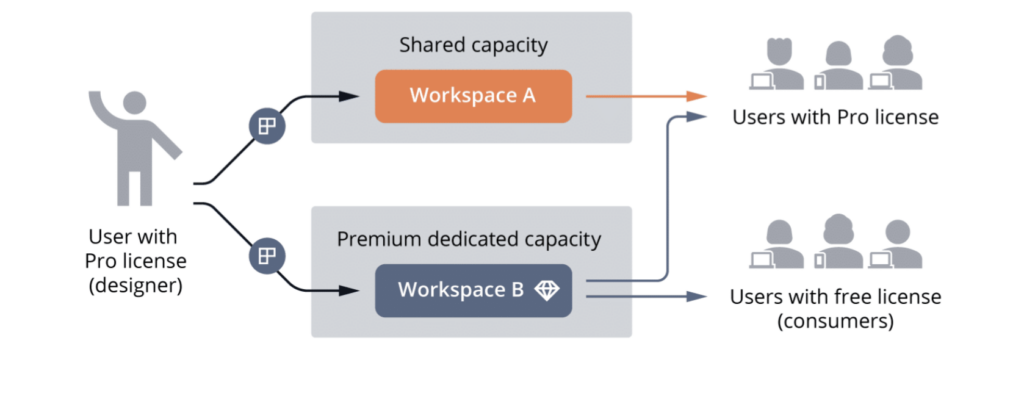
It’s also important to note that Power BI Free doubles as a viewer license for Power BI Premium. This means that clients or colleagues without Power BI can still view your reports using the associated Power BI Free license. We’ll touch on this further when we look at the features and benefits of Power BI Premium.
What is the Difference Between Power BI Pro and Free?
Power BI Pro is the most popular Power BI licensing option. This paid license bridges the gap between Power BI Free and Power BI Premium, with more storage and functionality. Most importantly, it allows you to share and collaborate with all the end-users covered by your organization’s Power BI license.
If you need to share Power BI reports with other users, you’ll need Power BI Pro. The additional storage and refresh capacity will also help your team be more productive while working with Power BI.
What Are Pro vs. Premium Licenses in Power BI?
Power BI Premium offers even more features and storage capacity than Power BI Pro. These additional Premium features are essential for large organizations or organizations growing at a rapid pace. There are many different types of licenses within the Premium category, so ultimately you’ll need to determine which version meets your enterprise’s unique data management needs.
What Does Power BI Pro Include?
A Power BI Pro license gives you a maximum dataset size of 1GB and maximum storage of 10GB per user. This allows your team to work with much larger volumes of data than the free version. Additionally, Power BI Pro allows you to refresh your datasets 8 times per day at half-hour intervals, making it much easier to work with changing datasets.
To publish and share your reports, you’ll need to upgrade from the free version to Power BI Pro. Keep in mind that if you want to share your reports with others, they will also need to have a Power BI Pro license.
Many organizations already have access to Power BI Pro as part of the Office 365 Enterprise E5 license. This makes it easy to start using Power BI right away at the Pro level and then upgrade to a Premium license later as your organization grows.
If you don’t already have Office 365 Enterprise E5, Power BI Pro costs $14 per user per month, billed annually. For example, if you have 10 Power BI users in your organization, you’ll pay $140 per month for their licenses.
Power BI Pro is a great way for SMBs and entrepreneurs to get started with Power BI. However, as your organization grows, you may need to upgrade to the advanced features and extra storage space of a Power BI Premium license.
What Replaced Power BI Premium P SKUs
Power BI Premium used to come in two forms: per-capacity P SKUs and embed-focused EM SKUs. Microsoft retired the P SKUs, which we cover below, while EM SKUs continue as a separate embed license we cover later on.
Power BI Premium P SKUs (P1 through P5) were removed from purchase for new customers on July 1, 2024, and non-EA renewals of existing P SKU capacity ended February 1, 2025. Organizations running on P SKU capacity move that workload to Microsoft Fabric F SKU capacity instead.
Fabric capacity is priced and sized differently than the old P SKUs, and it covers workloads beyond Power BI. If you’re weighing capacity tiers or migrating an existing P SKU workload, our guide to Microsoft Fabric licensing and capacity walks through the F SKU tiers and how the transition works.
In general, we recommend capacity-based licensing, now Fabric F SKU capacity, if over 500 people within the organization will be using the program. It’s necessary if you have multiple users accessing reports, especially since they may be consuming at different times of the day and require ongoing data refreshes. The advanced features that come with that capacity also enable your organization to do more with the data you have.
Keep in mind that even if your organization has Fabric capacity or Premium Per User, you still need a Power BI Pro license to publish reports to the Power BI Service. However, users only needing to view reports only require a Power BI Free license assigned within Power BI Service tenant.
Fabric F SKU capacity also offers dedicated resources that aren’t pooled with other tenants, unlike Pro’s shared capacity. This is helpful for enterprises with high volumes of data that need their own dedicated storage and compute.
Exact dataset size limits and refresh counts vary by F SKU tier, and access to Power BI Report Server (the on-premise version of Power BI) still depends on the capacity size you choose.
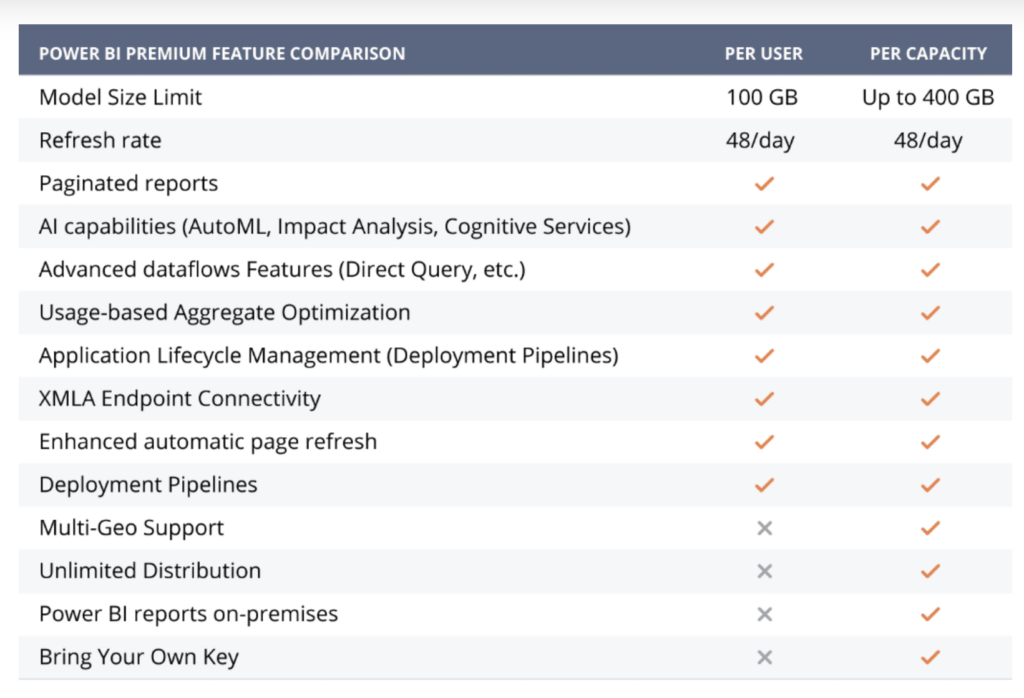
Premium-tier licensing, whether through Fabric capacity or Premium Per User, also comes with a variety of advanced features that aren’t available with the Free or Pro versions. This includes AI and machine learning features. Some of the most notable additional features include:
- Datamarts: Datamarts is a low-code data warehousing solution that allows users to manage a variety of different data sources and build reports quickly.
- Dataflow Direct Query: This feature pulls data directly from the dataflow at the time of the query.
- Deployment pipelines: This feature automates the deployment of reports and models to dev and test workspaces before deploying to a production workspace.
- Automatic page refresh: Ensures that your page will refresh automatically at set intervals or triggers rather than having to refresh manually or wait for scheduled refreshes.
What are the Power BI Embed Licenses (EM and A SKUs)?
The Power BI Embed licenses (EM SKUs), also considered a Premium license, allow you to embed Power BI reports within a Teams or a SharePoint site. This means end-users don’t need any Power BI license to view your reports.
However, you do need a Power BI Pro license to publish and maintain reports in the Power BI Service. There are three levels of EM SKUs, and just like the P SKUs, they increase in cost and capacity with each tier.
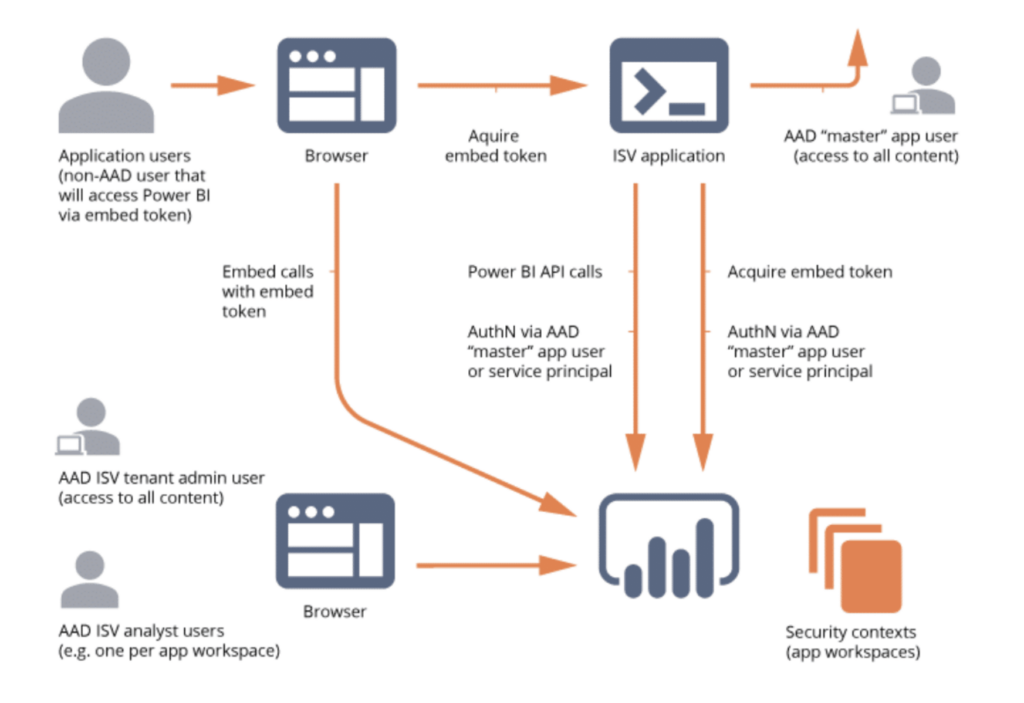
Large enterprises need to share data reports with a wide range of clients and partners. With EM SKUs, you’ll be able to share Power BI content easily even if your end user doesn’t have a license.
Meanwhile, the A SKUs, another Premium license, allow independent software vendors to embed Power BI reports in existing web applications via Microsoft Azure. Essentially, it’s like white-labeling Power BI for your application.
If your developers want to embed Power BI features in an app they’re creating for your organization, they’ll need an A SKU to do so. In most cases, you’ll also be using Azure Analysis Services along with your A SKU Premium license, but this is a topic for another day.
What’s Power BI Premium Per User License?
This Power BI license option costs $24 per user per month, billed annually. While this option is more expensive than a Pro license, it gives your users access to most Power BI Premium features. Users with a PPU license will be able to create, access, and share reports in PPU workspaces.
However, this option offers fewer advanced features than a full premium license. For example, you won’t gain access to Power BI Report Server (on-premise reporting). However, this is a good middle-ground option for organizations that aren’t quite ready for a Premium per-capacity license but still need access to some premium features.
Power BI Pricing at a Glance for 2026
Power BI Pro costs $14 per user per month, and Power BI Free is (obviously) free. Power BI Premium Per User costs $24 per user per month. Fabric F SKU capacity is priced per capacity tier rather than per user, so it doesn’t fit neatly into a per-seat table; we’ve summed up the per-user options below.
| Plan | Price | Billing | Best for |
|---|---|---|---|
| Power BI Free | $0 | N/A | Individual use, or viewing reports on qualifying capacity |
| Power BI Pro | $14/user/month | Billed annually | Teams that need to publish and share reports |
| Premium Per User | $24/user/month | Billed annually | Teams that need Premium features without buying capacity |
| Fabric F SKU capacity | Priced per capacity tier, not per user | Pay-as-you-go or reserved | Organizations replacing retired Premium P SKUs or running Fabric workloads beyond Power BI |
Pricing last verified against Microsoft’s official Power BI pricing page in September 2026.
Power BI Pro vs. Premium Per User vs. Fabric Capacity
Pro and PPU are per-user licenses: every person who needs one pays for it individually, and the cost scales directly with headcount. Fabric F SKU capacity works the opposite way. You buy one capacity tier for the organization, and depending on the tier, some users with only a Free license can view Fabric-hosted content, though publishers still need Pro or PPU.
PPU makes sense when a smaller group needs Premium features, like larger datasets and more frequent refreshes, without committing to a capacity purchase. Fabric capacity tends to make sense once enough users are consuming reports that per-user licensing costs more than a shared capacity tier would, or when the organization needs Fabric workloads beyond Power BI, like data engineering or real-time analytics.
Power BI Pro vs. Premium: Which Power BI License Do I Need?
You’re a good candidate for Fabric capacity if you have at least 500 users. However, it’s not a hard and fast rule.
There are some scenarios in which you may want to get Premium Per User or Fabric capacity even if you have fewer users. For example, you work with very large datasets, need dedicated capacities, or require a higher storage limit. If you have to refresh your datasets more than 8 times a day, you’ll also need Premium Per User or Fabric capacity.
Power BI Premium also gives you access to Power BI Report Server, which may be required if you handle critical information that must stay on-premise. Some organizations might also opt to purchase the Power BI Report Server separately from the Premium licenses. This is accomplished by purchasing SQL Server Enterprise Edition with Software Assurance for approximately $40,000 for two years.
Keep in mind that even if you opt for Fabric capacity, Premium Per User, or Embed licenses, you’ll still need a Pro license in order to publish your reports.
Frequently Asked Questions About Power BI Licensing
Can we keep running reports on our existing Power BI Premium P SKU capacity if we haven’t renewed yet?
Non-EA renewals of P SKU capacity ended February 1, 2025. If your renewal window has already passed, Microsoft won’t renew that capacity, so you’ll need to move the workload to Fabric F SKU capacity or a per-user license before it lapses.
Is Premium Per User enough if we don’t need Fabric’s other workloads?
Yes. Premium Per User gives you the Premium feature set at a per-user price without a capacity purchase. It usually only makes sense to move to Fabric capacity once you need workloads beyond Power BI, like data engineering or real-time analytics, or once per-user licensing costs more than a capacity tier would.
If we upgrade some users from Pro to Premium Per User, does the whole team need the upgrade too?
No. PPU is assigned per user, so you can mix licenses: only the people who need Premium features, like larger datasets or more frequent refreshes, need a PPU license. Everyone else can stay on Pro.
Will switching to Fabric capacity change how our end users view reports?
Not for people who already have a Pro or PPU license. Depending on the capacity tier, some organizations can also let users with only a Free license view Fabric-hosted content, which can reduce how many paid licenses you need to buy.
What happens if our Premium P SKU renewal already lapsed?
Once a P SKU renewal lapses, that capacity stops working and any reports relying on it become unavailable to their audience until you move to a new license. Talk to your Microsoft account team or a partner about migrating to Fabric F SKU capacity before your renewal date to avoid downtime.
Still Need Help Choosing Your Power BI License?
This guide was a quick rundown of all of the different Power BI licensing options and your head might still be spinning. If you need help understanding which Power BI license will best meet your needs, get in touch with Collectiv or consider our Visioning Program. Our Power BI consulting services can help you choose the right licensing mix and manage the migration off retired Premium capacity.